LLM. Neural nets. AI. ChatGPT. Abominable Intelligence
How large language models actually work, what context is, and how to use them effectively.

Nearly any task can be either substantially simplified or fully offloaded to neural nets.
Writing docs, contracts, customer replies, code, test checklists, plus picking up a new language, planning a diet, walking you through the tax code, and thousands of other things.
The theory, briefly
First I need to explain how a neural net actually works. To use any tool well you need at least a surface-level understanding of how it works. A neural net is NOT ARTIFICIAL INTELLIGENCE. It doesn’t think. That matters. A Large Language Model does one thing only — it predicts the next token for your input. The prediction is based on information the model was previously “trained” on.
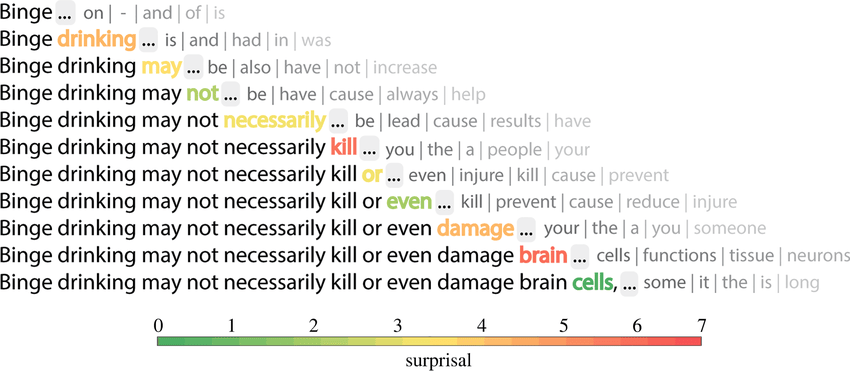
And here’s the key part: a neural net has no memory. Not the kind of memory humans have, anyway. Every new message in a chat isn’t an addition to an ongoing conversation — it’s an entirely new request. When you hit send, you re-send the whole chat history — from your first “hi” to the current question. The model doesn’t remember what you said to it a minute ago. It just receives a blob of text and predicts the next token from that. So every request is like talking to a brand-new stranger, and to keep them in the loop you hand them the full transcript of what the previous stranger said. That transcript is the context window, or simply the context.
Understanding what context is is the core of working with neural nets. A good prompt, plus a cleanly supplied and bounded context, is the whole recipe.
Practices and recommendations
Below is my list of tools, approaches, and practices that actually make this work. They all boil down to keeping the context as clean and focused as possible.
Guard the context
Remember: every new message is a new request. The model reads the entire history. For precise answers, follow the rule: one task — one chat. Skip the pleasantries. The model doesn’t care about your manners, and filler words just pollute the context. Phrase things sharply and to the point.
Don’t do this
You: Write 5 headline variants for an article about digital marketing.
Net: reply
You: Tell me about the main sights of Rome
Net: reply
This dumps unrelated data into context, and your Rome itinerary is going to come out with a marketing aftertaste. And don’t do this either:
You: You’re an experienced QA with experience in … Your job is to analyze screenshots and write test cases. Here’s a screenshot.
Net: test case
You: Another screenshot.
Net: test case
You: bug here, fix it
Net: fixes it
another 100 screenshots and corrections
You’ll drown the model’s memory in stale data, and every mistake you correct will poison the context and warp the final output. The bigger the context, the slower the response — and, more importantly, the more expensive. If your first message in this chat costs $0.0001, the last identical-looking message will cost $10, and the output will be worse anyway.
Do this instead
Chat 1
You: Write 5 headline variants for an article about digital marketing.
Net: reply
Chat 2
You: Tell me about the main sights of Rome.
Net: reply
Simple enough. But what if you genuinely need the model to share some standing context across chats, without walking it through the setup every single time? That’s the next section.
Build personas / models / folders / GPTs
Depending on the interface you use, you can set up your own model or a persona. In ChatGPT these are called GPTs, in Claude they’re Projects, in OpenWebUI they’re folders or custom models. Under the hood you’re just defining a base prompt that gets prepended to every message you send.
Don’t keep pushing. Surrender.
Model doing the wrong thing? Returning garbage? Failing over and over?
Stop. Don’t keep going in this chat.
Maybe what you want simply can’t be done, or maybe something in your input is steering the model off course. Try to work out what went wrong, and start a new chat with a corrected prompt. Still getting trash? Maybe what you want can’t be done at all. Ask the model (in a separate chat) whether what you want is actually doable, or whether what it’s suggesting makes sense. Go google it. But don’t argue with the model. If you want to change its behavior, do it in the very first message. If you want to point at fresher documentation, link to it in the very first message. Every wrong answer stays in the context and keeps poisoning it.
Be specific
If you’ve managed people, this will be easier. The better you are at articulating your thoughts, the easier this gets — but keep in mind that a neural net is a program, and a program has one fatal flaw: it does exactly what you wrote, not what you meant. Always explain the task as precisely as possible; don’t leave the model any freedom. If you know there are several directions it could go, or several ways to implement what you want, name the one you actually want. Don’t know which one? Read on.
Research
Ask the model to walk you through the best approaches / practices / solutions for your task. Ask follow-up questions until you understand them. Only then ask the model to actually execute. And if you don’t feel like writing the brief yourself — ask the model to draft the prompt for you.
Verify
The neural net bullshits. Ruthlessly. Shamelessly. It bullshits so fluently you’ll never catch it lying. It will argue with you and insist the sky is green. Keep sharpening your own expertise and double-check anything you’re uncertain about. Never accept or act on a neural net’s answer without independent verification in a domain you don’t know well. The neural net is an assistant, not a replacement.
Plan
If your task is compound — say you want the model to analyze some document and answer questions about it — ask all the questions up front. If you want to write or refactor a chunk of code, write the spec first and only then hand it over.
Don’t do this
You: make a table view of the data
LLM: Done
You: now add filtering by status
LLM: Done
You: also add search
LLM: Done
You: now I want sorting by date
LLM: Done
You: and by name too
LLM: Done
First, this is expensive — in real-world scenarios every one of those messages can cost a dollar apiece — and second, it degrades the output because of context bloat. You can get the same result faster, cleaner, and cheaper.
Do this instead
You: Build a table view of the data with filtering by status, pagination, and the ability to sort by date or name.
LLM: Done
Use neural nets in daily life
Learn Spanish, look up diet plans, ask how to unclog your kitchen drain. Don’t get dependent on them, but automate and simplify wherever you reasonably can. In the new world, knowing how to use neural nets is just as essential as knowing how to use a smartphone.